






Most digital business card demos look the same. A card is tapped, a profile opens on a phone, a contact is saved, and everyone in the meeting nods. The differences between providers show up later: when the quote for your real headcount arrives, when IT asks about single sign-on, when the first lead from a trade show fails to reach the CRM, or when someone leaves and their card is still out in the world.
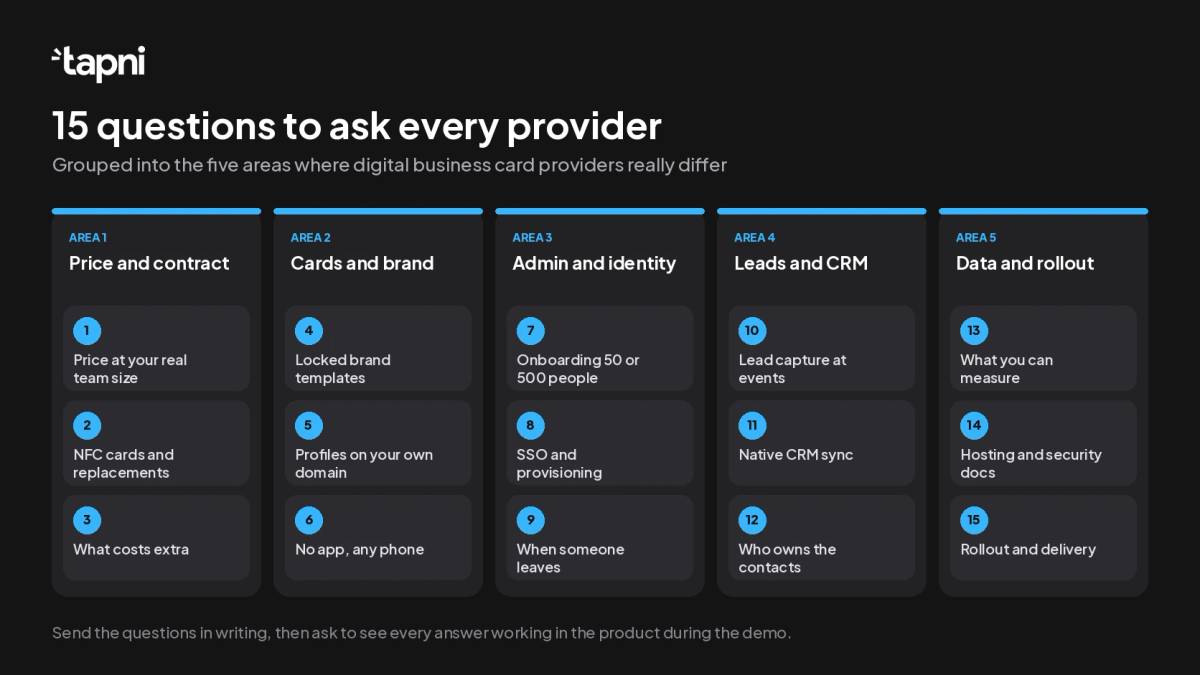
This guide gives you 15 questions to ask every digital business card provider before you buy, grouped into five areas: price and contract, cards and brand, admin and identity, leads and CRM, and data, analytics and rollout. For each question you will find why it matters, what a strong answer sounds like and the red flag to watch for. A scorecard you can copy sits near the end. We make Tapni, a digital business card and lead capture platform for teams that is part of Tapstack, so we also show how we answer each question. Use the questions with any provider you are considering.
The short version
- Price and contract: get a written price for your real team size, including cards, add-ons and the plan that actually has the features you need.
- Cards and brand: check that admins can lock the design, that profiles can run on your own domain and that the people you meet don't need an app.
- Admin and identity: ask how 50 or 500 people get onboarded, which plan includes SSO and automatic provisioning, and what happens when someone leaves.
- Leads and CRM: see how leads are captured at meetings and events, which CRMs sync natively and who owns the data.
- Data, analytics and rollout: ask what you can measure, where data is hosted and how long it takes to get printed cards into people's hands.
How to use these questions
A buying process for digital business cards rarely needs a formal tender, but it does need structure. Teams that skip it tend to choose on design and discover the gaps during rollout.
- Agree on your must-haves first. Before any demo, decide which answers are deal-breakers. For most companies these are the CRM you already use, the identity requirements from IT and a budget per person per year.
- Shortlist two or three providers. More than three makes demos blur together. Fewer than two leaves you without a price reference.
- Send the questions in writing. Ask for written answers before the demo, then use the call to see the answers working in the product rather than on a slide.
- Score every answer the same way. Use the scorecard below, weight the areas that matter most to you, and keep notes on anything that was promised but not shown.
- Run a short pilot. Give the leading option to a handful of people for two weeks: real meetings, a real event if you have one, a test lead in your CRM and a test offboarding.
Price and contract
1. What will we pay per user in year one and year two, at our real team size?
Why it matters: list prices are usually shown for one user or a small team, and the price that matters is the one for your headcount. Minimum seat counts, monthly versus annual billing and volume tiers can change the total a lot.
A strong answer: a written quote for your current team size and for the size you expect in a year, with the billing period, any minimum number of seats and how the price changes as you add people. Ask whether year two costs the same as year one.
Red flag: a per-user price that only applies above a seat count you will never reach, or a quote that leaves out the plan you actually need.
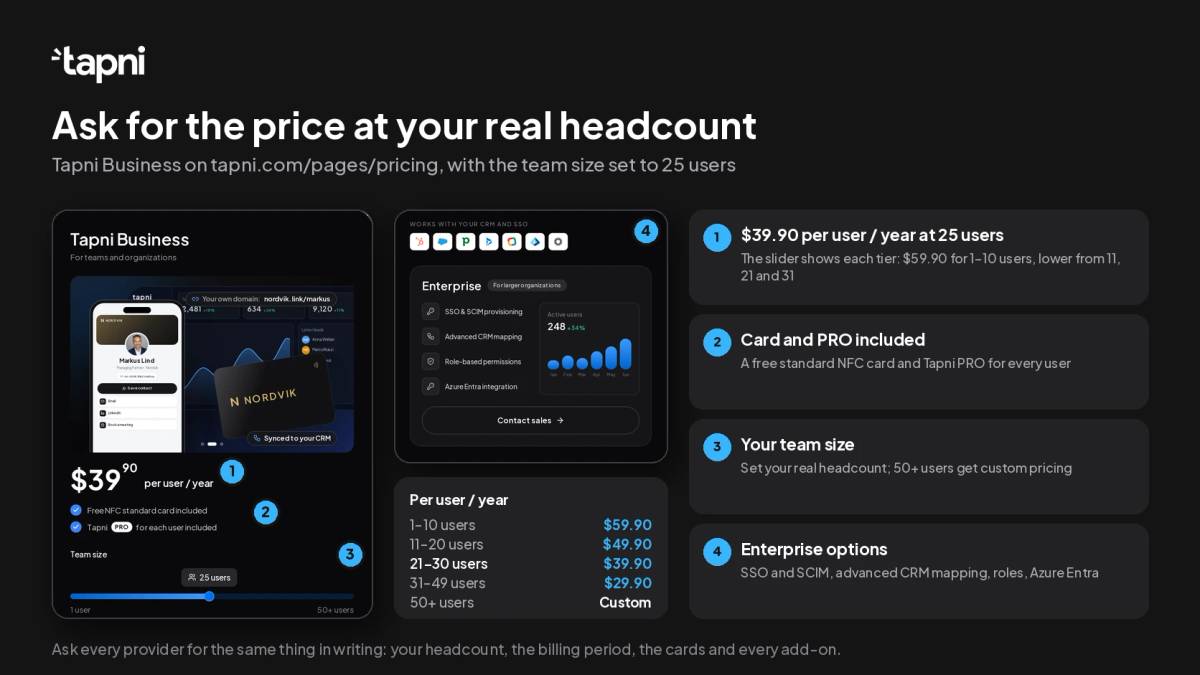
How Tapni answers: Tapni Business is priced per user per year, and volume discounts apply automatically as the team grows. On our pricing page it costs $59.90 per user per year for 1–10 users, $49.90 for 11–20 users, $39.90 for 21–30 users and $29.90 for 31–49 users. Teams of 50 or more get custom pricing. For a full breakdown of pricing models and hidden costs, see our guide to digital business card pricing for teams.
2. Are physical NFC cards included, and what do replacements cost?
Why it matters: some providers sell software only and charge for every physical card, custom design or reprint on top. If everyone on your team will hand out a card, the hardware is part of the price.
A strong answer: a clear statement of which card is included per user, which materials and designs cost extra, what a replacement costs and whether a card can be reassigned to a new employee instead of being thrown away.
Red flag: cards priced only after the contract is signed, or cards that are tied to one person forever.
How Tapni answers: every Tapni Business user gets a free standard NFC card and Tapni PRO. Cards come in PVC, bamboo or metal, printed with your design and each person's name. Cards without a printed name can be reassigned to another employee from the dashboard, so they are reused rather than reprinted.
3. Which features cost extra: lead capture, CRM sync, SSO or your own domain?
Why it matters: the entry plan is often not the plan a business team ends up on. CRM integrations, single sign-on, custom domains and event lead capture are the features most often placed in a higher tier, sold as add-ons or charged per event or per scanned badge.
A strong answer: a feature list for the exact plan you are quoted, with every add-on and usage-based fee written down. If lead capture is charged per scan, ask for an estimate based on the events you attended last year.
Red flag: "that is available on Enterprise" for a feature you consider basic, without a price.
How Tapni answers: Tapni Business includes the team dashboard, lead capture, shared branding, CRM integrations, wallet passes, admin controls and analytics. Enterprise, for larger organisations, adds SSO and SCIM provisioning, advanced CRM mapping, role-based permissions and the Azure Entra integration, and is quoted by our sales team.
Cards, profiles and brand
4. Can admins lock our brand and decide what employees can edit?
Why it matters: without central templates, every employee designs their own profile, and your brand looks different on every phone. Job titles and phone numbers drift out of date.
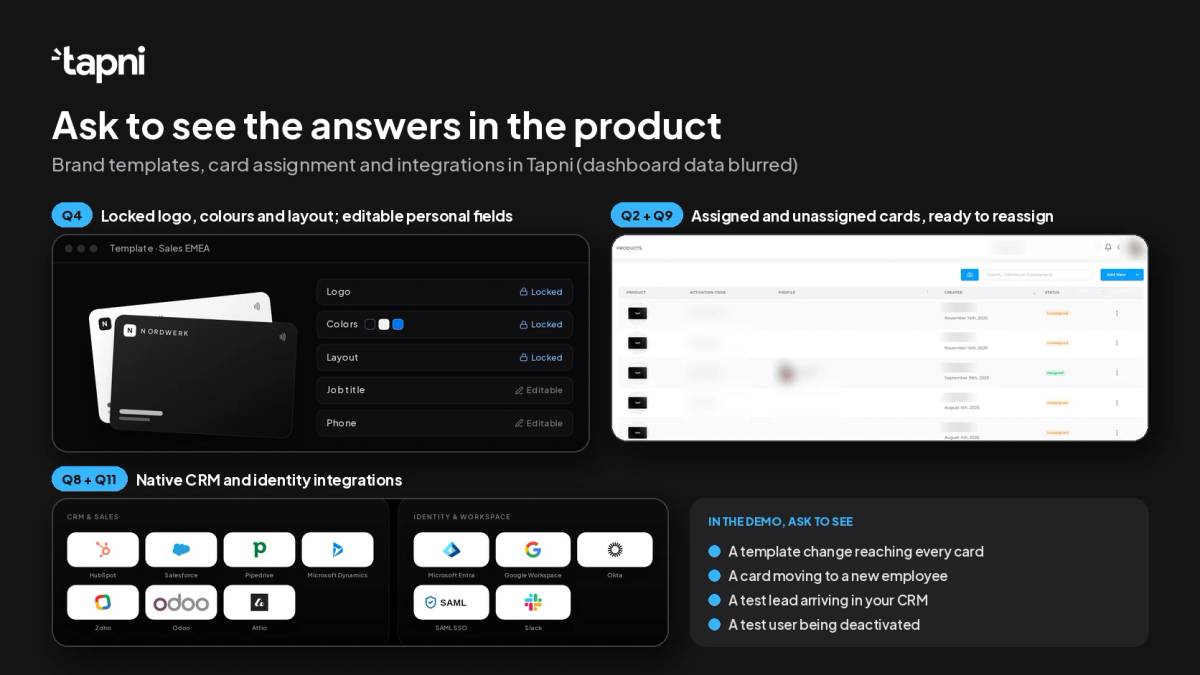
A strong answer: templates set by an admin, with the logo, colours and layout locked and only personal fields such as job title or phone left editable. A change to the template should update everyone's profile at once.
Red flag: brand consistency that depends on every employee following a style guide.
How Tapni answers: admins design templates once and assign them to teams. Logos, colours and layouts live in the template, and admins decide which fields people can edit. Templates use variables, so each person's card, wallet pass and email signature shows their own name and details rather than the admin's.
5. Can profiles run on our own domain?
Why it matters: a profile link on your own domain looks more trustworthy in an email or a QR code, and it keeps your brand in front of the people your team meets.
A strong answer: a documented setup for a custom domain or subdomain, which plans include it and who handles verification.
Red flag: every profile permanently on the provider's domain with no option to change it.
How Tapni answers: profiles can live on your own domain, such as yourcompany.link/julia. You add the domain in the dashboard, our team verifies it, and you add a CNAME record with your domain provider. The steps are in our help guide to connecting a custom domain.
6. Do the people we meet need an app, and does it work on every phone?
Why it matters: a digital card is only useful if the other person can open it in seconds, whatever phone they carry and whether or not their phone reads NFC.
A strong answer: no app needed on the receiving side, NFC for phones that support it, a QR code for phones that don't, and options to share from the phone's wallet or by link.
Red flag: any flow where the recipient has to install something or create an account.
How Tapni answers: the person you meet taps the card or scans its QR code with their camera, and the profile opens without an app. If their phone doesn't support NFC, the QR code on the card or in the Tapni app works instead. Employees can also share from Apple Wallet or Google Wallet passes. If you only need QR codes for flyers or booths, our free QR code generator is a good place to start.
Admin and identity
7. How do we add 50 or 500 people, and keep their details up to date?
Why it matters: creating profiles one by one works for five people, not for a sales organisation. Setup time should not grow with team size.
A strong answer: bulk import from a file, a sync with your directory so new hires get a profile automatically, and bulk actions for changes across many profiles.
Red flag: onboarding that depends on every employee signing up and filling in their own profile from scratch.
How Tapni answers: admins can import people from a CSV file or Google Sheets, or connect Microsoft Entra ID or Google Workspace so profiles are created and updated automatically; which directory options you use depends on your plan. Bulk actions in the dashboard let you change many profiles at once, assign teams and download QR codes for a whole group.
8. Do you support single sign-on and automatic provisioning, and on which plan?
Why it matters: for many IT teams, single sign-on and automatic user provisioning (often through SCIM) are requirements, not extras. They decide whether access ends automatically when someone leaves.
A strong answer: the identity providers supported, the protocols (SAML, OIDC, SCIM), setup documentation your IT team can read before signing, and the plan that includes them.
Red flag: "SSO is on the roadmap", or SSO that is only available as a custom project.
How Tapni answers: Tapni supports single sign-on with SAML, Microsoft Entra ID or Okta, with help guides for Azure, Okta and Google Workspace setups. SSO and SCIM provisioning are part of the Enterprise plan.
9. What happens to a card, profile and leads when someone leaves?
Why it matters: a printed paper card can't be recalled, but a digital one can. If offboarding is slow, a former employee's card can keep sharing their details on your behalf, and their contacts can leave with them.
A strong answer: an admin can deactivate the profile immediately, the physical card can be reassigned, and the leads that person collected stay with the company.
Red flag: offboarding that needs a support ticket, or contacts that live only in the employee's personal account.
How Tapni answers: an admin deactivates a profile from the dashboard in one click, and the card stops sharing that person's details immediately. Unnamed cards can then be assigned to someone else. Our step-by-step guide to offboarding an employee's digital business card covers the full process, including how to secure their leads first.
Leads and CRM
10. How do we capture leads at meetings and events?
Why it matters: sharing your details is only half of networking. The value for a sales team is in the contacts you bring back, with enough context to follow up.
A strong answer: two-way contact exchange from the profile, a way to capture paper business cards and event badges, and notes, tags and reminders attached to each lead. Ask how lead capture is priced if you attend many events.
Red flag: lead capture that is a separate product with its own login and per-event pricing you can't predict.
How Tapni answers: leads come from the contact exchange form on every profile, from the AI business card scanner in the Tapni app, which captures details from paper cards and event badges, or from manual entry. Each lead can carry notes, tags and a follow-up reminder, and lead capture is part of the Business plan.
11. Which CRMs do you integrate with natively, and what reaches our CRM?
Why it matters: a lead that never reaches the CRM is a lead the company doesn't have. "Integrates with your CRM" can mean a native sync, a Zapier connection or a CSV file someone has to remember to upload.
A strong answer: a list of native integrations, a clear view of which fields are mapped and how leads are assigned to the right owner, and what happens when a connection's authorisation expires. Ask to see a test lead arrive in your CRM during the demo.
Red flag: "we integrate with everything" with no list, or a sync that only runs as a manual export.
How Tapni answers: Tapni has native integrations with HubSpot, Salesforce, Pipedrive, Microsoft Dynamics, Zoho, Odoo and Attio, plus Zapier, Microsoft Outlook, SFTP export and a public API. Advanced CRM mapping is available on Enterprise. Our guide to digital business card CRM integration explains how the sync works and which decisions to make before you connect.
12. Who owns the contacts, and can we export everything if we leave?
Why it matters: the contacts your team collects are company data. You need to be able to get them out, whether an employee leaves or you change provider.
A strong answer: contacts are stored at company level, admins can export them at any time in a standard format, and the contract states what happens to your data at the end of the subscription.
Red flag: exports limited to higher tiers, or contacts that sit in each employee's personal app.
How Tapni answers: leads appear in the company's dashboard, sync to your CRM and can be exported as a CSV file.
Data, analytics and rollout
13. What can we measure, and at what level?
Why it matters: you will want to know whether the cards are used and which channels work, without turning the rollout into surveillance.
A strong answer: clear definitions of each metric, date filters, exports for your own reporting and an explanation of what is and isn't tracked.
Red flag: impressive-looking dashboards whose numbers nobody can define.
How Tapni answers: See your most active employees and each person's profile views by NFC tap, QR scan and link, with date filters and CSV/XLSX/PDF export.
14. Where is our data hosted, and what will our security team receive?
Why it matters: a digital business card platform holds employee data and every contact your team collects. Procurement and IT will ask where it lives and who can access it, often late in the process.
A strong answer: the hosting provider and region, a data processing agreement, a list of subprocessors, how access is controlled inside the platform and how security documentation is shared. Ask for these early so security review doesn't delay the rollout.
Red flag: vague answers about where data is stored, or no data processing agreement available.
How Tapni answers: Tapni platforms and customer data are hosted on Amazon Web Services in Frankfurt, Germany. A data processing agreement is available. Admins decide who gets admin rights in the dashboard, and Enterprise adds role-based permissions for admins, managers and members. Our help page on where your data is stored lists the details.
15. What does rollout look like, and how fast do cards arrive?
Why it matters: a platform can be right and still fail if nobody owns the rollout or the cards arrive after the event they were ordered for.
A strong answer: a named contact for onboarding, a rollout plan for your team size, a realistic timeline for design approval, printing and shipping, and what support costs after launch.
Red flag: onboarding sold as an expensive extra, or no clear delivery timeline for printed cards.
How Tapni answers: rollout takes three steps: design your card and profile template, import your team, and ship and go live. We print and ship the cards, and free onboarding support is included. Production takes 3–4 business days after your order is confirmed, then shipping depends on the destination: DHL Standard takes 4–7 business days and DHL Express 2–3 business days within Europe, and DHL Express takes 3–4 business days worldwide. For larger teams, send us your design and a list of names and titles and we print every card. Our seven-step rollout plan for teams covers the people side, from the pilot group to adoption.
A vendor scorecard you can copy
Score each provider from 0 to 2 on every question: 0 if the answer is missing or a red flag, 1 if it is partly covered or needs a higher plan, and 2 if it is covered on the plan you are quoted and shown in the product. Multiply each area's points by its suggested weight, then compare totals. Adjust the weights to your priorities; a sales-led team might weight leads and CRM higher, while a regulated company might weight admin and identity higher.
| Area (questions) | Weight | What a 2 looks like |
|---|---|---|
| Price and contract (1–3) | ×2 | Written quote for your headcount, cards and add-ons included, no surprise tiers |
| Cards, profiles and brand (4–6) | ×1 | Locked templates, your own domain, no app for the recipient |
| Admin and identity (7–9) | ×2 | Bulk import or directory sync, SSO on a known plan, one-click offboarding |
| Leads and CRM (10–12) | ×3 | Lead capture included, native sync to your CRM shown live, full export |
| Data, analytics and rollout (13–15) | ×2 | Defined metrics, hosting and DPA documented, onboarding and delivery dates agreed |
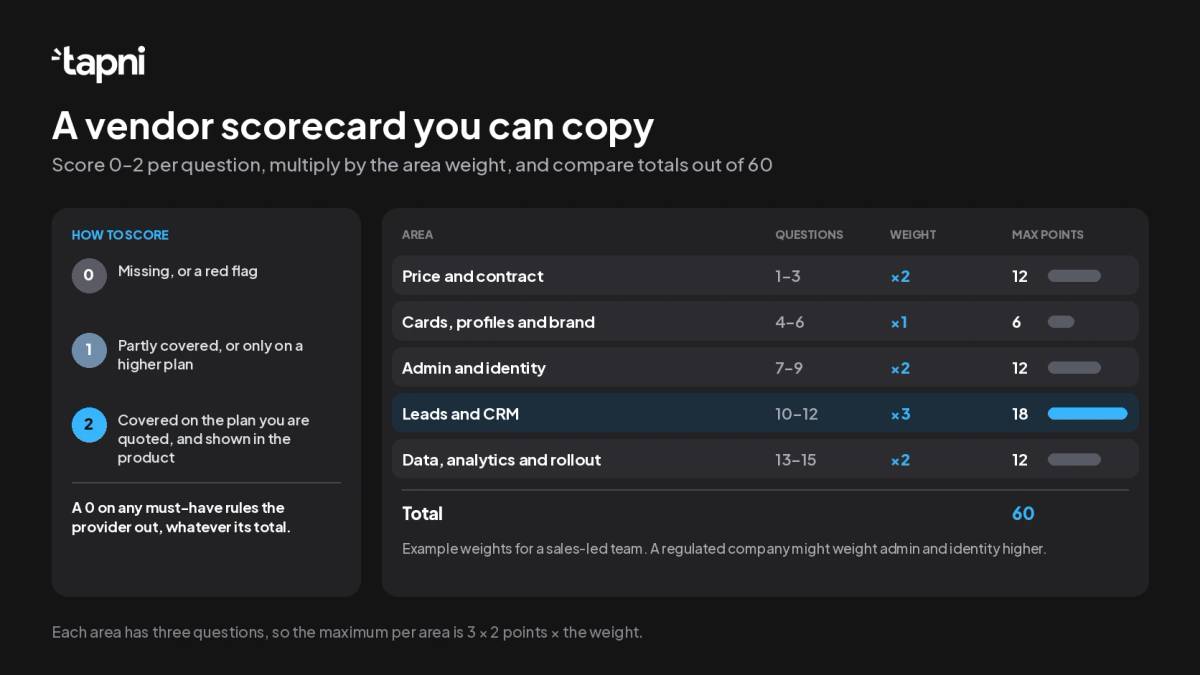
With these weights, the maximum score is 60. Any provider with a 0 on one of your must-haves is out, whatever its total.
Red flags that should end the conversation
- No written price for your team size. If a provider can't put a number on paper for your headcount, you can't budget for next year either.
- No native integration with your CRM. A manual export is a workaround, not an integration, and it is the first thing to break after rollout.
- No admin control over offboarding. If deactivating a former employee's card needs a support ticket, it will not happen fast enough.
- Contacts that belong to the employee. Leads collected for the company should stay with the company.
- Security answers that only come after signing. Hosting, data processing terms and access control should be clear before procurement signs off.
FAQ
What should I look for in a digital business card provider?
For a team, look beyond the card design. Check the real price for your headcount, whether NFC cards are included, central brand control, bulk onboarding and offboarding, native sync with your CRM, single sign-on if IT needs it, clear data hosting terms and a rollout plan with delivery dates.
How many providers should we compare?
Two or three is usually enough. Send all of them the same questions in writing, score the answers the same way, and run a short pilot with the leading option before you sign a contract for the whole company.
How long does it take to choose and roll out a digital business card provider?
Plan on a few weeks to choose, including demos and a security review, and about a month to roll out: a two-week pilot, admin setup and templates, and one onboarding session per team. Printed cards need time for design approval, production and shipping, so order them well before your next event.
Do we need NFC cards, or is an app enough?
Profiles can be shared by QR code, link or wallet pass without a physical card. NFC cards make sharing faster in person and give your team something to hand over at meetings and events, which is why many teams choose a provider that includes a card for every user.
How much does Tapni cost for a team?
Tapni Business costs $59.90 per user per year for 1–10 users, with lower per-user prices from 11, 21 and 31 users, and custom pricing for 50 or more. Every user gets a free standard NFC card and Tapni PRO.
Put Tapni through the 15 questions
The right provider is the one that answers all 15 questions on the plan you are quoted, and can show you the answers in the product. If you want to put Tapni through the same test, visit Tapni for Business or book a 30-minute demo with our team. We will walk you through the dashboard, profiles and lead capture, answer your questions on CRM sync, SSO and data, and put together a rollout plan and pricing for your team size.


